From Clunky Workflows to Smart Editing: How LightPDF Is Revolutionizing Document Management
Imagine the frustration of a student trying to extract quotes from a scanned 80-page research paper while racing against a midnight submission deadline. Picture a business owner attempting to edit a contract PDF, convert financial spreadsheets to Excel, and redact sensitive client data—all under a tight schedule and without an expensive Adobe subscription.
Have you ever found yourself endlessly toggling between sketchy free online converters, suffering through slow file uploads, and manually retyping text from flattened PDFs, only to end up with broken document formatting before completing a single task?
If any of these scenarios sound familiar, you have likely stumbled upon an operational goldmine called LightPDF.
LightPDF offers a ground-breaking, execution-first approach to document handling, moving far beyond basic file utilities that only handle simple format changes. Engineered as a complete digital document ecosystem, this cross-platform software functions as a complete “Department-of-One” taskforce for your files. It equips students, professionals, founders, and enterprises with intelligent tools capable of executing complex document workflows directly across Web, Desktop, and Mobile.
Let’s dive deep into what makes this next-generation PDF workstation tick, how you can navigate its ecosystem like an experienced operations director, and how to process your documents without hitting tedious operational bottlenecks.
What Exactly Is LightPDF?
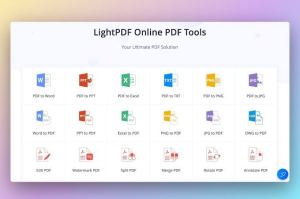
At its core, LightPDF is an advanced, AI-powered document workstation engineered to automate end-to-end PDF editing, file conversion, OCR extraction, and interactive document analysis. Moving far beyond superficial text tools, it operates as an all-in-one assistant that takes direct action: modifying inline PDF text, compressing bulk files, generating e-signatures, and summarizing multi-page reports via AI.
Instead of functioning as a slow, single-purpose converter, the platform brings unified execution straight to your preferred screen. When you open a project here, you are not simply viewing a file. You are leveraging an engine that extracts editable text from scanned images via high-accuracy OCR, indexes full-length contracts for instant Q&A, and batches heavy file conversions with zero system lag.
Because LightPDF syncs seamlessly across devices (Windows, macOS, iOS, Android, and Web), your document workflows, signed contracts, and annotated files remain organized, accessible, and protected under a single account.
What Can You Find on the Platform?
If your daily routine involves reading contracts, converting reports, extracting data from scanned receipts, or securing sensitive files, chances are remarkably high that you can streamline it within this platform. The workstation is broadly organized into four primary operational pillars:
1. AI-Powered PDF Assistant & Interactive Analysis
This is where the platform truly shines in the age of modern AI. If you are reviewing dense academic papers, complex legal documents, or lengthy quarterly reports, this is your command center. LightPDF allows you to interact directly with your documents:
- Chat with PDF: Ask questions about specific sections, extract key metrics, or translate foreign passages directly from the text.
- Instant Summaries: Automatically generate concise, structured key takeaways from multi-page documents in seconds.
2. Comprehensive Editing & File Conversion
Need to alter a PDF contract or convert a presentation on short notice? LightPDF automates end-to-end document modifications:
- Direct Text & Image Editing: Change wording, adjust fonts, add images, or reorder pages directly within the native PDF layout.
- Multi-Format Conversion: Swiftly convert files to and from PDF—including Word, Excel, PowerPoint, PNG, and JPG—without losing original formatting.
3. High-Precision OCR & Batch Processing
Manual retyping is a thing of the past. Utilizing advanced Optical Character Recognition (OCR), LightPDF’s extraction engine scans image-based files and flattened PDFs to make them fully searchable and editable across dozens of languages. Furthermore, batch processing capabilities allow you to convert or compress scores of files simultaneously.
4. Security, Signatures & Multi-Device Sync
Why restrict your document workflow to a desktop desk setup? LightPDF lets you switch dynamically between desktop, mobile, and web interfaces:
- Digital E-Signatures: Add legal e-signatures or stamp contracts on the go.
- Document Protection: Password-encrypt sensitive files, configure user permissions, and redact confidential text.
- Cross-Device Sync: Keep your signed agreements and edited files updated across desktop computers and mobile devices.
How to Work Like an Operations Director: Tips & Tricks
With an impressive array of document capabilities available, basic file viewing only scratches the surface of what the system can achieve. How do you leverage LightPDF to extract maximum productivity value?
Master the Document Extraction & AI Workflow
The platform’s AI engine is your best secret weapon when digesting high volumes of information. Instead of spending hours reading through dense paperwork:
- Gather Key Document Insights: Upload lengthy reports to the AI Assistant to automatically extract action items, dates, and core financial figures.
- Automate Text Extraction via OCR: Run scanned receipts, invoices, or book pages through the OCR engine to convert non-selectable text into editable Word documents.
- Streamline Batch Conversions: Compile multi-department files into a single, structured PDF or compress large folders for clean email distribution.
Key Workstation Concepts to Master
Understanding the core operational philosophy behind LightPDF will help you get the most out of your document processing:
- Department-of-One Taskforce: This is the operational framework where a single user can easily handle editing, file conversion, design markups, and digital signing without needing to jump between multiple specialized applications.
- Cross-Platform Access: This concept gives you the complete flexibility to start a document task inside your Web browser, make precision text edits on a Windows or Mac desktop app, and finalize sign-offs via a mobile app on iOS or Android.
- High-Accuracy OCR: This optical text-recognition technology scans non-editable, static files—like flattened PDFs or photos of paper documents—and transforms them into fully searchable, editable digital formats.
Why Choose LightPDF for Your Workflow?
In a software landscape crowded with expensive subscription models and bloated applications, there is something deeply empowering about operating a platform built specifically for fast, complete document execution.
When comparing LightPDF Pro to traditional legacy PDF software, several operational advantages become immediately clear:
- Native AI Summarization & Chat: LightPDF provides built-in AI capabilities natively across all platforms, whereas legacy editors often force users to rely on third-party plugins or pay for separate higher-tier AI add-ons.
- Universal Multi-Platform Support: LightPDF covers Web, Windows, Mac, iOS, and Android under one subscription, while traditional competitors frequently restrict access to single licensed devices or charge extra for mobile access.
- Lightweight System Impact: LightPDF is built for zero-lag performance with instant startup times, contrasting sharply with resource-heavy legacy suites that suffer from large installations and high memory usage.
- Standardized Batch Processing: Essential batch conversion and OCR features come standard in LightPDF, whereas traditional editors often reserve bulk-processing capabilities strictly for expensive enterprise plans.
When you integrate LightPDF into your daily routine, you eliminate the friction of context-switching between online converters, external compression sites, and standalone PDF viewers. LightPDF balances deep document editing capabilities with intelligent AI execution, making professional file management accessible regardless of your team size or technical expertise.
Additionally, because LightPDF is designed to run seamlessly across Web, Mobile, and Desktop platforms, you can review contracts, process receipts, and generate summaries wherever you operate.
Scaling Productivity with Intelligent Document Automation
Are you currently drowning in repetitive file conversions, manual text retyping, or fragmented signature collection? The workstation isn’t just a basic reader—it functions as a scalable operational foundation.
By establishing structured workflows inside LightPDF, you can build a self-sustaining document pipeline that processes incoming scans, secures confidential records, and speeds up sign-offs with minimal friction.
Start Building Your Smart Document Workflow
Managing files is far more than opening attachments—it is about acting on information, protecting sensitive data, and executing tasks with precision. Whether you are preparing academic assignments, managing business contracts, or optimizing administrative archives, a smarter, faster way to work is waiting to be unlocked.
Take command of your operational workflow, deploy AI document tools, and experience the power of modern PDF management. Explore LightPDF today and transform how you read, edit, and convert documents!
Shop Now